Zombie Couple Video GeneratorTurn Two Photos into a Love Story
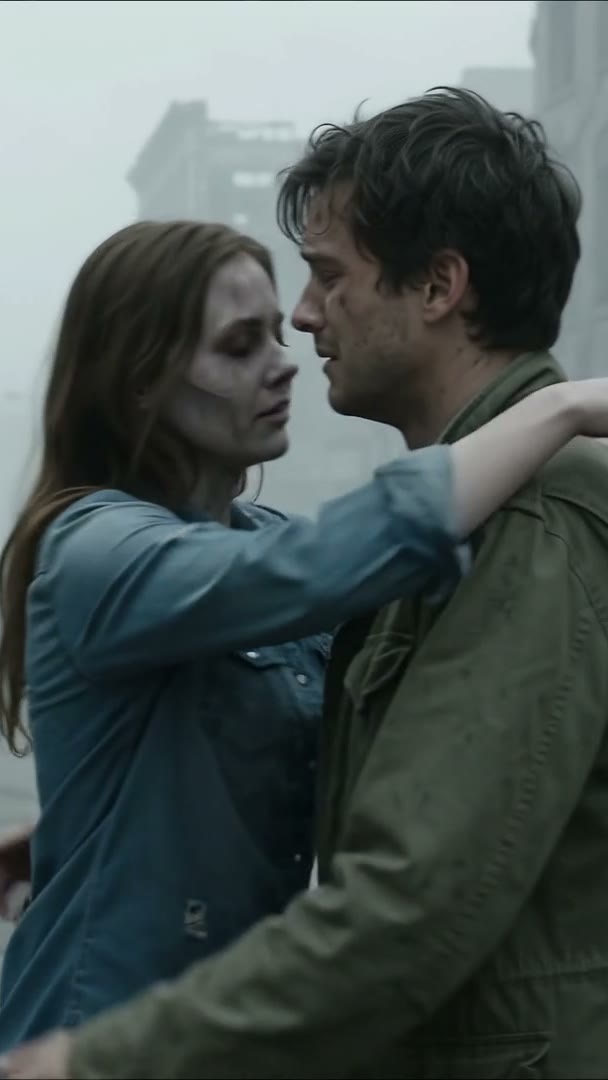
One partner turns into a zombie. The other lowers their weapon. They embrace, then a happy memory brings them back to who they were. Start with your two photos.
1Add two photos
JPG, PNG, WebP · up to 10 MB
Photo 1 is the survivor; Photo 2 becomes the zombie. Use clear photos of consenting adults, not drawings.
2Story preview
The complete love story
AI-generated showcase · Recognition, an embrace and a happy memory. Results vary by photos and model.
Site credits are deducted for the selected settings and returned on confirmed failure.
When you generate, photos are sent to Kie.ai. Uploaded files are retained for about 24 hours under Kie’s current policy. Only use authorized photos.
Add your two photos. One partner turns, the other lowers their weapon and embraces them, then the scene cuts to a happy memory.
AI zombie effect
What is an AI zombie video generator?
MakeZombieVideo is an online creative tool designed around the AI zombie love story. Choose separate photos of yourself and a partner, friend or family member, or use one photo together. Your pet can be the other character, too, bringing familiar faces into a cinematic world after the outbreak.
The story opens with a tense reunion: one character has become a zombie. The other raises a weapon, recognizes the person they love and lowers it. An embrace leads into a warm memory from before everything changed—the same two people smiling together in a sunlit field. The heart of the story is connection, rather than transformation alone.
Default: Seedance 2.0 Mini via Kie.ai,720p,12 seconds,vertical9:16. Expand settings to change model,resolution,5–15 second duration or format. Approved-email tests consume the site’s Kie balance. Default12 seconds. Standard,Fast and Pro support5–15 seconds; Ultra also supports20 and30 seconds. Pro and Ultra offer1080p. Queue times vary; refreshing resumes the task.
The complete love story
Couple video still · AI-generated showcase
How it works
How to make an AI zombie video
Prepare your story in three steps, on a phone or computer. No app to install and no prompt to write from scratch.
1
Add your photos
Choose two clear portraits or one photo together. With separate photos, Photo 1 is the survivor and Photo 2 is the person or pet who turns. A shared photo assigns the roles left to right. Use real, well-lit photos with clearly visible faces.
2
Choose roles and settings
Default: Seedance 2.0 Mini via Kie.ai,720p,12 seconds,vertical9:16. Expand settings to change model,resolution,5–15 second duration or format. Approved-email tests consume the site’s Kie balance. Default12 seconds. Standard,Fast and Pro support5–15 seconds; Ultra also supports20 and30 seconds. Pro and Ultra offer1080p. Queue times vary; refreshing resumes the task.
3
Download and share after generation
Approved test accounts can confirm photo permission and generate. The page tracks progress, then provides a player and result link. Save the video promptly; use an editor such as CapCut for personal captions or music.
Put yourselves in an end-of-the-world love story. Choose who turns and who still recognizes them, then let the reunion and embrace express “I would choose you anyway.”
Best friends
Give your closest friendship an unexpected reunion. “I would never leave you, even as a zombie” can be played sincerely or paired with a joke only the two of you understand.
Family connections
Parents and adult children, or siblings, can be the two characters. Use photos of consenting adults. Want your furry companion in the story? Switch to pet mode.
Halloween ideas
Plan a Halloween story from your photos without arranging costumes or makeup. Choose roles with a friend or partner, then bring your own seasonal captions and ideas.
Pricing
Buy credits as needed, or save with a plan
Video counts assume the standard 720p, 12-second setting at 10 credits. Other models, resolutions and durations can change credit use. Applicable taxes are calculated at Creem checkout.
Secure Creem checkout. Applicable taxes are shown before payment. Monthly credits expire at period end; yearly credits are issued once and expire at annual period end.
Secure Creem payment. One-time purchase, no automatic renewal; pack credits never expire. Confirmed failures return deducted site credits.
Savings compare standard-video costs with the Single credit pack.
How many credits does a video use?
Credits below are for a 12-second video. Model, resolution and duration affect credit use; aspect ratio does not change the cost for otherwise identical settings.
How many credits does a video use?
Model
480p
720p
1080p
StandardSeedance 2.0 Mini
5 credits
10 credits
—
FastSeedance 2.0 Fast
8 credits
17 credits
—
ProSeedance 2.0
10 credits
20 credits
50 credits
UltraSeedance 2.5
17 credits
37 credits
93 credits
Credits are reserved before generation and fully returned on confirmed failure. Unknown outcomes are checked first. Site credits differ from Kie credits.
Why MakeZombieVideo
Fewer steps. More of your story.
Prepare photos, assign roles and choose your settings around a zombie love story. Recognition, an embrace and a memory share one story direction, without starting from a blank prompt.
Choose a plan without committing first
Preview one-time credit packs and subscriptions to suit how often you create. Purchases are not open yet, so no charges are collected.
A direct path from your photos
Use two portraits or one shared photo, and switch between adult and pet modes. A prepared story gives you a direction rather than a blank page.
Familiar faces at the center
Photos guide the model’s character appearance. Likeness, role assignment and scene transitions can vary and should be reviewed for each result.
Prepare on phone or computer
Select photos, swap roles and change settings in your browser without installing an app. The step-by-step layout also works on small screens.
Connection over gore
The story direction centers on hesitation, recognition and an embrace. An apocalyptic setting highlights affection in a tender fantasy story.
Photos sent only when you generate
When generating, our server sends photos to the selected provider:Google for Veo or Kie.ai for Seedance. Only upload authorized photos.
FAQ
AI zombie video generator FAQ
Can I make an AI zombie video for free?
Approved-email tests with daily limits. Generation consumes the selected provider’s API balance; purchases are unavailable.
What is an AI zombie video generator?
It is a photo-based creative tool for a zombie love story: recognition, a lowered weapon, an embrace and a happy memory. Prepare two adult characters, or yourself and a pet.
How do I prepare a zombie video from photos?
Choose two portraits or one shared photo, select adult or pet and your settings, confirm permission, then generate. Approved test emails can play or download successful results.
Do I need an account or a payment card?
Approved-email tests with daily limits. Generation consumes the selected provider’s API balance; purchases are unavailable.
Does the story include the lowered weapon, hug and memory?
That is the intended story direction: recognition in an apocalyptic setting, an embrace and a happy flashback. Current illustrations explain the concept; the complete video and transitions still require generation testing.
Which photos work best? Can I use one photo together?
Yes. Use real, well-lit photos with clear, unobstructed faces. Separate portraits assign roles individually; a shared photo places the survivor on the left and zombie character on the right. JPG, PNG and WebP under 10 MB each are supported.
Can I choose who becomes the zombie?
In separate-photo mode, Photo 1 is the survivor and Photo 2 turns. Adult mode has a swap button. Pet mode keeps you first and your pet second. Shared photos use left-survivor, right-zombie positioning.
How long is the video, and how long does it take?
Default12 seconds. Standard,Fast and Pro support5–15 seconds; Ultra also supports20 and30 seconds. Pro and Ultra offer1080p. Queue times vary; refreshing resumes the task.
Can I add my own memory photo or clip?
Current uploads are character references, with no separate memory-media input. After generated video becomes available, you could use an editor such as CapCut to append personal photos, clips, captions or songs.
Which AI models can I choose?
Seedance2.0 Mini,Seedance2.0 Fast,Seedance2.0 and Seedance2.5 via Kie.ai. Availability depends on access,balance and service status.
Are my face photos stored or uploaded?
When generating, our server sends photos to the selected provider:Google for Veo or Kie.ai for Seedance. Only upload authorized photos.
Can I use iPhone or Android without an app?
The current photo preparation tools work directly in a phone or computer browser. Mobile supports separate and shared photos, adult and pet choices, and the expandable settings panel.
Is the story frightening or gory?
The direction is a tender fantasy in an apocalyptic setting, focused on recognition and an embrace rather than graphic horror. Current images are original story illustrations; actual generated content will still need review.
Can I use my dog or cat? What about just myself?
Pet mode supports two photos of you and a pet, or one shared photo. The story is designed for two characters and does not currently support a lone-person portrait for the complete reunion plot.
Are credits returned if the model request or generation fails?
Confirmed failures return all deducted credits. Site credits return to the original account balance, not as cash to a bank card. Processing, lost connections, refreshing and unknown submissions require confirmation; each failed task is refunded once. Subscription credits are valid for the billing period; pack credits never expire. Canceling renewal preserves the paid period.
Start your AI zombie story
Choose your photos and prepare a story of love at the end of the world: a lowered weapon, an embrace, and a happy memory.
 A zombie story. A human connection.